Context
Documentation is more and more created in Markdown on platforms like GitHub and GitLab, also by business analysts, functional analysts and product owners. Including UML diagrams is possible with PlantUML, and the GitHub / GitLab support for this tool is excellent.
Hoever, PlantUML does not natively support Decision Requirements Diagrams (DRD)
from the Decision Model and Notation (DMN)) standard.
This reference document provides a reusable macro and style library (dmn-drd.puml) to approximate official DMN shapes and requirement connectors.
The result is a diagram like this:
1. Reusable theme with macros
Save the following code as dmn-drd.puml to include it across multiple diagrams with !include dmn-drd.puml, or paste it directly at the top of a single diagram.
' ==========================================
' DMN DRD (Decision Requirements Diagram) Theme
' ==========================================

top to bottom direction
skinparam shadowing false
skinparam defaultFontName "SansSerif"
skinparam defaultFontSize 13

' Hide stereotype labels on shapes while keeping them for CSS-like styling
hide <<Decision>> stereotype
hide <<InputData>> stereotype
hide <<BKM>> stereotype
hide <<KnowledgeSource>> stereotype

<style>
  rectangle {
    LineThickness 1.5
    Padding 12
    Margin 10
    HorizontalAlignment center

    ' 1. Decision: Sharp-cornered rectangle
    .Decision {
      BackgroundColor #E3F2FD
      LineColor #1565C0
      FontColor #0D47A1
      FontStyle bold
      RoundCorner 0
    }

    ' 2. Input Data: Pill / stadium shape via large corner radius
    .InputData {
      BackgroundColor #E8F5E9
      LineColor #2E7D32
      FontColor #1B5E20
      RoundCorner 35
    }

    ' 3. Business Knowledge Model (BKM): Chamfered corners
    .BKM {
      BackgroundColor #F3E5F5
      LineColor #6A1B9A
      FontColor #4A148C
      DiagonalCorner 16
    }
  }

  ' 4. Knowledge Source: Document shape
  file {
    .KnowledgeSource {
      BackgroundColor #FFF8E1
      LineColor #F57F17
      FontColor #E65100
      LineThickness 1.5
      Padding 12
    }
  }

  arrow {
    LineColor #37474F
    LineThickness 1.3
  }
</style>

' --- Node Macros ---
!procedure Decision($alias, $label)
  rectangle "$label" as $alias <<Decision>>
!endprocedure

!procedure InputData($alias, $label)
  rectangle "$label" as $alias <<InputData>>
!endprocedure

!procedure BKM($alias, $label)
  rectangle "$label" as $alias <<BKM>>
!endprocedure

!procedure KnowledgeSource($alias, $label)
  file "$label" as $alias <<KnowledgeSource>>
!endprocedure

' --- Requirement Connector Macros ---
' Solid line + filled arrow (Information Requirement)
!procedure InfoReq($from, $to)
  $from --> $to
!endprocedure

' Dashed line + arrow (Knowledge Requirement)
!procedure KnowledgeReq($from, $to)
  $from ..> $to
!endprocedure

' Dashed line + circle endpoint (Authority Requirement)
!procedure AuthorityReq($from, $to)
  $from ..0 $to
!endprocedure
2. Macro syntax cheatsheet
Nodes
| Macro | DMN Element | Description |
|---|---|---|
Decision($alias, "$label") |
Decision | Evaluates logic to produce an output from inputs. |
InputData($alias, "$label") |
Input Data | External data required by a decision. |
BKM($alias, "$label") |
Business Knowledge Model | Reusable decision logic (e.g., decision table, function). |
KnowledgeSource($alias, "$label") |
Knowledge Source | Governing authority, policy, or regulation. |
Connectors
| Macro | DMN Requirement | Arrow Style | Valid Direction |
|---|---|---|---|
InfoReq($from, $to) |
Information Requirement | Solid line + filled arrowhead | InputData → Decision Decision → Decision |
KnowledgeReq($from, $to) |
Knowledge Requirement | Dashed line + open arrowhead | BKM → Decision BKM → BKM |
AuthorityReq($from, $to) |
Authority Requirement | Dashed line + filled circle | KnowledgeSource → Decision KnowledgeSource → BKM KnowledgeSource → KnowledgeSource |
3. Complete usage example
@startuml

' Store the theme in a file next to this markdown and let GitLab include it:
::include{file=dmn-drd.puml}


' Define DMN Elements
Decision(d_routing, "Determine Claim Routing")
Decision(d_eligibility, "Check Policy Eligibility")

InputData(i_claim_amt, "Claim Amount")
InputData(i_policy_type, "Policy Type")
InputData(i_customer_age, "Customer Age")

BKM(b_risk_table, "Risk Scoring Table")
KnowledgeSource(k_regulations, "Insurance Act 2026")

' Connect Elements
InfoReq(i_claim_amt, d_routing)
InfoReq(d_eligibility, d_routing)
InfoReq(i_policy_type, d_eligibility)
InfoReq(i_customer_age, d_eligibility)

KnowledgeReq(b_risk_table, d_routing)
AuthorityReq(k_regulations, d_eligibility)
AuthorityReq(k_regulations, b_risk_table)
@enduml
4. Official notation mapping
| DMN Element | Official OMG Notation | PlantUML Approximation |
|---|---|---|
| Decision | Sharp-cornered rectangle 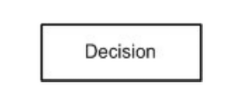 |
rectangle with RoundCorner 0  |
| Input Data | Oval / stadium pill 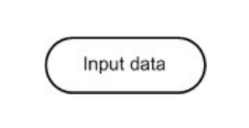 |
rectangle with RoundCorner 35 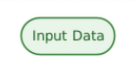 |
| Business Knowledge Model | Rectangle with 2 clipped corners 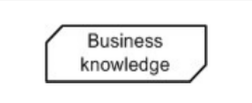 |
rectangle with DiagonalCorner 16 (clips 4 corners)  |
| Knowledge Source | Document with wavy bottom 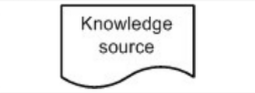 |
file shape (folded top-right corner)  |
| Authority Requirement | Dashed line + filled dot 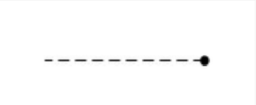 |
Dashed connector with circle (..0) 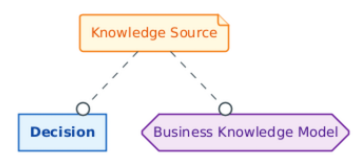 |
5. Customization: Monochrome mode
To match strict black-and-white OMG DMN specification styling, replace all BackgroundColor values in <style> with #FFFFFF and set all LineColor and FontColor values to #222222.
6. About the include
There are several ways to include the theme with macros (dmn-drd.puml) in your plantuml code:
-
Include the theme code by pasting it at the top of your diagram. Easy, but does not scale well, especially not if you later want to adapt the theme. Guaranteed to work everywhere you use PlantUML.
-
Use the PlantUML code for include
!include dmn-drd.puml- this should work in some tools, but I did not test it. -
Use the GitHub / GitLab way to include a file
::include{file=dmn-drd.puml}- I tested this on GitLab, it works.